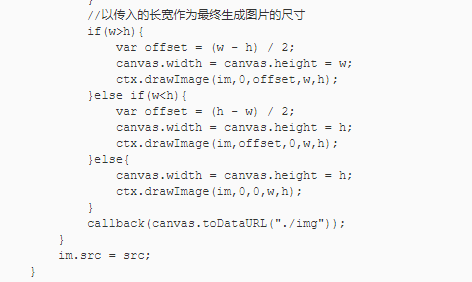
大家可以复制下面代码,到你新建的htnl文件里,然后运行一下,当然里面的“img”文件夹自己建了。
<!DOCTYPE html>
<html>
<head>
    <meta charset="utf-8">
    <meta http-equiv="X-UA-Compatible" content="IE=edge,chrome=1">
    <title>Canvas改变生成缩略图</title>
    <meta name="description" content="">
    <meta name="keywords" content="">
    <link href="" rel="stylesheet">
    <style type="text/css">
        .source{
            float: left;
        }
        img{
            margin-top: 20px;
            border: 1px solid #f00;
        }
        .change{
            margin-left: 10px;
            float: left;
        }
        i{
            font-size: 12px;
        }
    </style>
</head>
<body>
<div class="source">
    <label for="">原图:</label><br/><img src="https://t8.baidu.com/it/u=1484500186,1503043093&fm=79&app=86&size=h300&n=0&g=4n&f=jpeg?sec=1585107708&t=736415ae9eb64eb0467fc78a8c82fa64" alt="">
</div>
<div class="change">
    <label>选择尺寸</label>
    <select name="" id="size">
        <option value="100X100">100X100</option>
        <option value="200X200">200X200</option>
        <option value="300X300" selected>300X300</option>
        <option value="400X400">400X400</option>
        <option value="800X400">800X400</option>
        <option value="500X500">500X500</option>
    </select> <i>可右击另存查看尺寸</i><br />
    <img src="" alt="" id="show">
</div>
<script type="text/javascript">
    window.URL.createObjectURL(file);
    var show = document.getElementById("show"),
            size = document.getElementById("size"),
            src = './img/111.jpg';
    size.onchange = function(){
        var value = this.value,
                arr = value.split('X'),
                w = arr[0],
                h = arr[1];
        setImage(src,w,h);
    };
    setImage(src,300,300);
    function setImage(src,w,h){
        resizeImage(src,function(data){
            show.src = data;
        },w,h);
    }
    function resizeImage(src,callback,w,h){
        var canvas = document.createElement("canvas"),
                ctx = canvas.getContext("2d"),
                im = new Image();
        w = w || 0,
                h = h || 0;
        im.onload = function(){
            //为传入缩放尺寸用原尺寸
            !w && (w = this.width);
            !h && (h = this.height);
            //以长宽最大值作为最终生成图片的依据
            if(w !== this.width || h !== this.height){
                var ratio;
                if(w>h){
                    ratio = this.width / w;
                    h = this.height / ratio;
                }else if(w===h){
                    if(this.width>this.height){
                        ratio = this.width / w;
                        h = this.height / ratio;
                    }else{
                        ratio = this.height / h;
                        w = this.width / ratio;
                    }
                }else{
                    ratio = this.height / h;
                    w = this.width / ratio;
                }
            }
            //以传入的长宽作为最终生成图片的尺寸
            if(w>h){
                var offset = (w - h) / 2;
                canvas.width = canvas.height = w;
                ctx.drawImage(im,0,offset,w,h);
            }else if(w<h){
                var offset = (h - w) / 2;
                canvas.width = canvas.height = h;
                ctx.drawImage(im,offset,0,w,h);
            }else{
                canvas.width = canvas.height = h;
                ctx.drawImage(im,0,0,w,h);
            }
            callback(canvas.toDataURL("./img"));
        }
        im.src = src;
    }
</script>
</body>
</html>