一:下载phpqrcode类文件
1.下载地址:https://sourceforge.net/projects/phpqrcode/
2.PHP环境必须开启支持GD2扩展库支持(一般情况下都是开启状态)
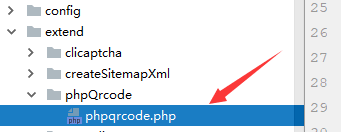
3.下载解压后,我们只需要“phpqrcode.php”文件就行了,其它的都删除。
4.然后把该文件放入“extend”文件夹下。
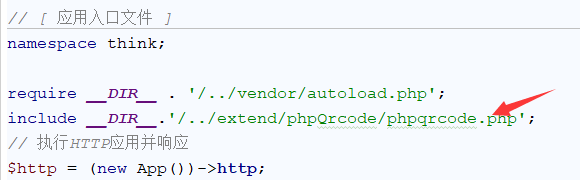
5、还要一个步骤,因为thinkphp6取消了vendor的引用形式,我们使用第三方类库的话,得去入口文件index.php里添加代码:
include __DIR__.'/../extend/phpQrcode/phpqrcode.php';如图所示:
6、ok,开始进行应该有的操作了,去你想生成二维码的方法里写代码吧,这里我测试时放在了这里,方便查看。
6.1:这里是生成链接的二维码:
  function index(){
//        ob_start();
        $value = 'https://www.alvinxiao.com';         //二维码内容
        $errorCorrectionLevel = 'L';  //容错级别
        $matrixPointSize = 5;      //生成图片大小
        $imgNmae = time().mt_rand(11, 30);
        //获取根路径
        $root_dir=public_path().'public/';
        $filename='uploads/qrcodeImg/' . date("Y-m-d");
        if(!is_dir($root_dir.$filename)){
            mkdir($root_dir. $filename , 0777, true);
        }
        //生成二维码图片
        $QrImgname = $root_dir.$filename.'/'.$imgNmae.'.png';
        \QRcode::png($value,$QrImgname , $errorCorrectionLevel, $matrixPointSize, 2);
        $QR = $QrImgname;        //已经生成的原始二维码图片文件
        $QR = imagecreatefromstring(file_get_contents($QR));
        //输出图片
        imagepng($QR, $QrImgname);
        imagedestroy($QR);

        View::assign(['QRimg'=>'/'.$filename.'/'.$imgNmae.".png"]);
        return view('index');
    }
html页面格式是这样【不要在意,这页面是在测试】
<!DOCTYPE html>
<html lang="en">
<head>
    <meta charset="UTF-8">
    <title>Title</title>
</head>
<body>
<img src="{$QRimg}">
</body>
</html>
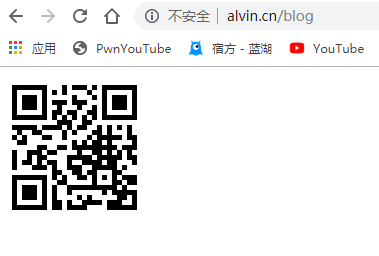
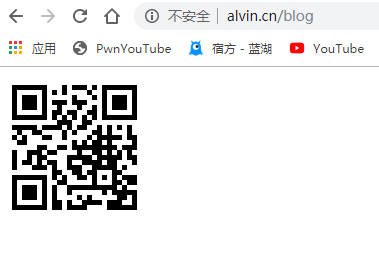
ok,然后生成的二维码图片如图:
6.2:接下来是生成logo或图片的二维码:
 function createLogoQrImg(){
        $value = 'https://www.alvinxiao.com';         //二维码内容
        $errorCorrectionLevel = 'H';  //容错级别
        $matrixPointSize = 6;      //生成图片大小
        $imgNmae = time().mt_rand(11, 30);
        //获取根路径
        $root_dir=public_path().'public/';
        $filename='uploads/qrcodeImg/' . date("Y-m-d");
        if(!is_dir($root_dir.$filename)){
            mkdir($root_dir. $filename , 0777, true);
        }
        //生成二维码图片
        $QrImgname = $root_dir.$filename.'/'.$imgNmae.'.png';
        \QRcode::png($value,$QrImgname , $errorCorrectionLevel, $matrixPointSize, 2);
        $logo = $root_dir.'uploads/mylogo.png'; //准备好的logo图片
        $QR = $QrImgname;      //已经生成的原始二维码图
        if (file_exists($logo)) {
            $QR = imagecreatefromstring(file_get_contents($QR));    //目标图象连接资源。
            $logo = imagecreatefromstring(file_get_contents($logo));  //源图象连接资源。
            $QR_width = imagesx($QR);      //二维码图片宽度
            $QR_height = imagesy($QR);     //二维码图片高度
            $logo_width = imagesx($logo);    //logo图片宽度
            $logo_height = imagesy($logo);   //logo图片高度
            $logo_qr_width = $QR_width / 4;   //组合之后logo的宽度(占二维码的1/5)
            $scale = $logo_width/$logo_qr_width;  //logo的宽度缩放比(本身宽度/组合后的宽度)
            $logo_qr_height = $logo_height/$scale; //组合之后logo的高度
            $from_width = ($QR_width - $logo_qr_width) / 2;  //组合之后logo左上角所在坐标点
            //重新组合图片并调整大小
            /*
             * imagecopyresampled() 将一幅图像(源图象)中的一块正方形区域拷贝到另一个图像中
             */
            imagecopyresampled($QR, $logo, $from_width, $from_width, 0, 0, $logo_qr_width,$logo_qr_height, $logo_width, $logo_height);
        }
        //输出图片
        imagepng($QR, $QrImgname);
        imagedestroy($QR);
        imagedestroy($logo);
        $logoQr='/'.$filename.'/'.$imgNmae.'.png';
        return $logoQr;
    }
然后调用这个方法就行了,当然,这里得准备一张logo,图片都行,但是不要太大
文件形式为:

最后生成的二维码为:
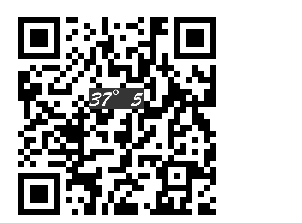
这是制作logo二维码,放在中间位置的
 function thumb(){
        header('Content-type: image/png');
        $width    = 70; //logo压缩为宽70
        $height   = 70;
        $value = 'https://www.gzjerryli.cn';         //二维码内容
        $errorCorrectionLevel = 'H';  //容错级别
        $matrixPointSize = 6;      //生成图片大小
        $imgNmae = time().mt_rand(11, 30);
        //获取根路径
        $root_dir=public_path().'public/';
        $filename='uploads/qrcodeImg/' . date("Y-m-d");
        if(!is_dir($root_dir.$filename)){
            mkdir($root_dir. $filename , 0777, true);
        }
        //生成二维码图片
        $QrImgname = $root_dir.$filename.'/'.$imgNmae.'.png';
        \QRcode::png($value,$QrImgname , $errorCorrectionLevel, $matrixPointSize, 2);
        $logos = $root_dir.'/storage/image/20200311/jerryli.jpg';//$root_dir.'uploads/mylogo.png'; //准备好的logo图片
        $QR = $QrImgname;      //已经生成的原始二维码图

        // 将头像文件缩小 并放置到二维码当中
        list($s_width,$s_height) = getimagesize($logos);
        list($d_width,$d_height) = getimagesize($QR);
        // 将图片裁减为指定的大小 50*50
        $blank = imagecreatetruecolor($width,$height);
        $logo  = imagecreatefromstring(file_get_contents($logos));
        imagecopyresampled($blank,$logo,0,0,0,0,$width,$height,$s_width,$s_height);
        $qrimage    = imagecreatefromstring(file_get_contents($QR));
        // 获取二维码的宽高 算出比例 放在图片的中间
        $m_width = round(($d_width - $width)/2,0);
        $m_height= round(($d_height- $height)/2,0);
        imagecopymerge($qrimage,$blank,$m_width,$m_height,0,0,$width,$height,100);
        // 合成新图像
        imagepng($qrimage,$QR);
        imagedestroy($qrimage);
        imagedestroy($blank);
        $logoQr='/'.$filename.'/'.$imgNmae.'.png';
        return $logoQr;
    }